Analytics Hub Agent

The Analytics Agent turns your questions into a report built on your live marketing data. You describe what you want to know and the agent picks the report configuration and builds it in the Analytics Hub.
With the Analytics Agent you can:
- Build a report starting from a question. Describe what you want to know and get the answer accompanied by a report. Every answer comes with a report configuration you can open, verify and edit.
- Analyze what the report shows. The agent can summarize and explain what the numbers represent. Use follow-up prompts to refine the report and go deeper.
Getting access
The Analytics Agent is enabled for the whole account, rather than for individual users. If you don't see it in the Analytics Hub, an admin on your account can turn it on. Accounts created after August 2026 have it available from the start.
How it works
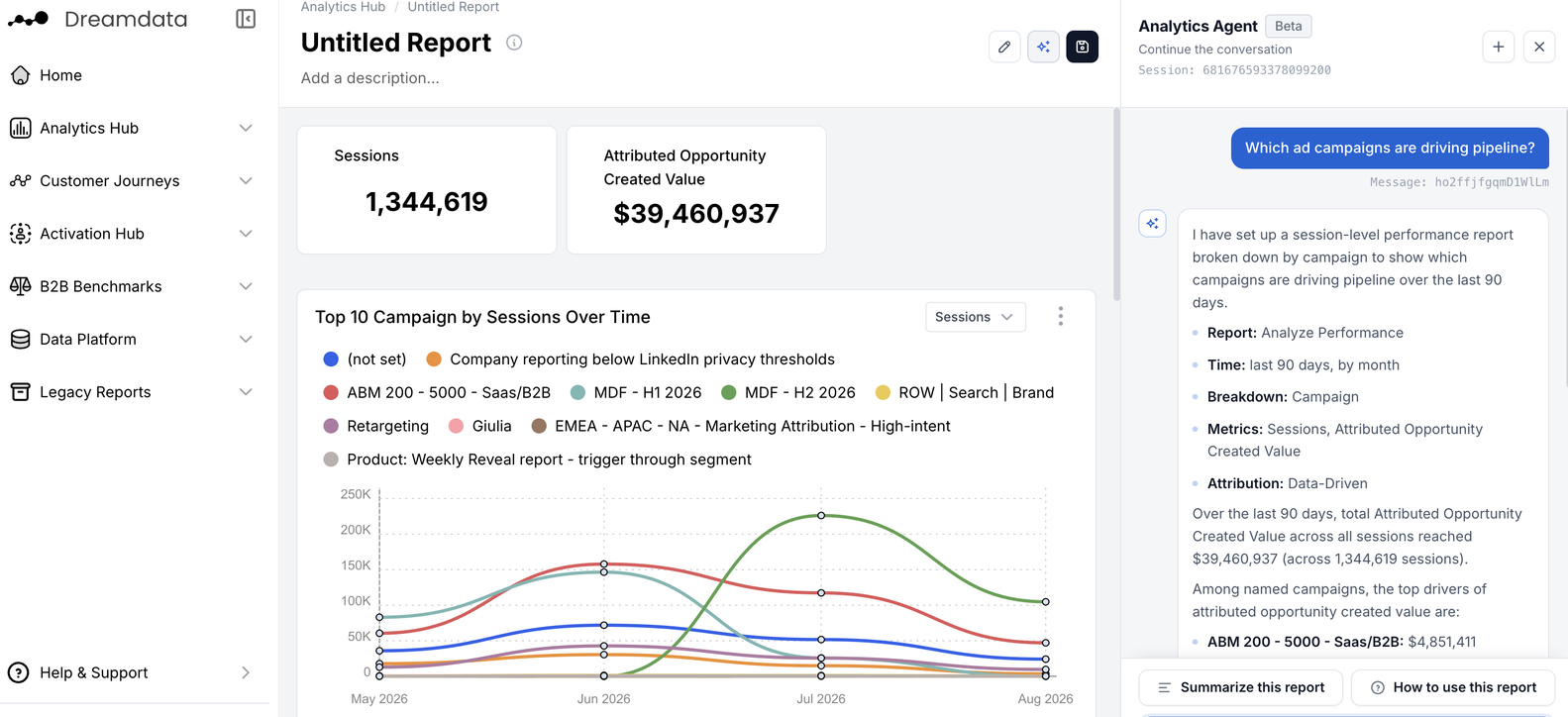
- You ask a question in Ask AI, the Analytics Agent interface in Analytics Hub.
- The agent will ask for clarifications if needed. If a question is too vague or has more than one answer, you get a question back.
- You get an answer, with the report alongside it. It is built using Dreamdata's semantic layer for how stages, channels, campaigns and attribution are defined. The agent summarizes what it built and can analyze the numbers beside the report.
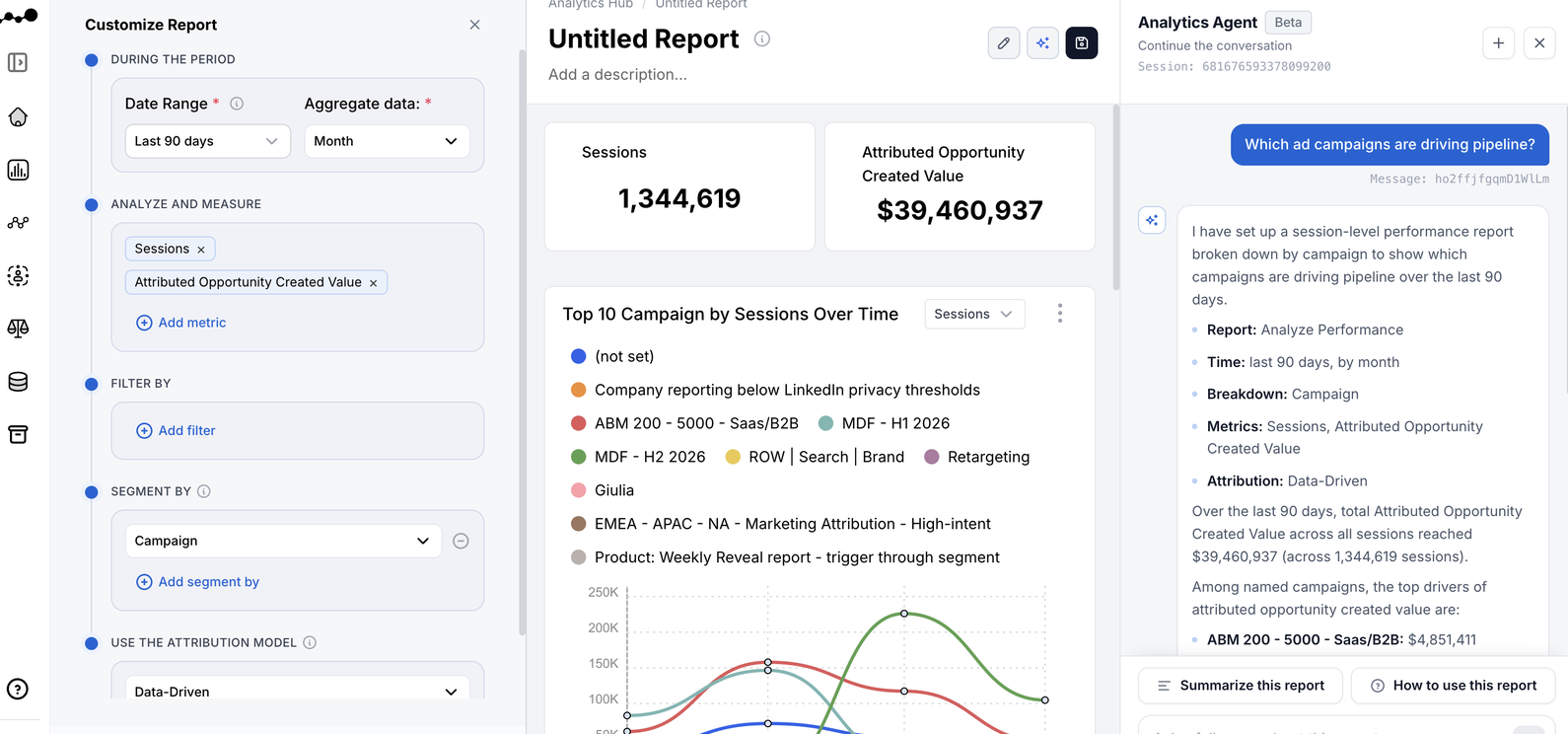
- The report configuration is available. Clicking “Customize report” opens the configuration chosen for the report, which can be adjusted as needed either manually or via the chat. The configurator opens on the left-hand side of the agent-built report (see screenshot below)
- You can keep asking. Use the agent alongside the report, or alongside any existing report, to ask more questions.
- You save it when you're done. Saving is what lets you come back to the report later, or add its widgets to a dashboard.
Prompting the Analytics Agent
- Anchor on an outcome, not a metric. “Which campaigns are driving pipeline?” goes further than “show me campaign data.”
- Name the time frame that's relevant for you. Otherwise the agent picks a sensible default, which you can correct in a follow-up.
- It's ok to start vague. You don't need to know the right report type or filter names to start.
- Ask what numbers mean. “What stands out here?” or “Which channels performed best?” are questions that the agent can answer based on the report.
- Watch for clickable options. When the agent needs you to pick a direction, it often offers buttons. You can always type a free-form reply instead.
- Tell us how we did. The thumbs up and thumbs down on each response go straight to the team building the agent and help us improve it.
Example prompts
If you're not sure where to start, you can use the following prompts as inspiration and adapt them to your own channels, content and time frames:
How did marketing influence pipeline last quarter?
What stands out in this report?
Asking follow-up questions can change a report. "Applied to your report" confirms the change, and Undo reverses it. Save the version to access it later.
Here are more specific prompt examples:
Performance
Ad spend and campaigns
Which ad campaigns are driving pipeline?
Follow up: Please break it down by ad platform and I would like to look at the spend for the last 6 months.
Which Google campaigns are creating the most pipeline?
Content performance
Which specific content assets helped create the most pipeline last quarter?
Follow up: Can we just look at the blog?
Did anyone who downloaded our benchmarks report end up buying?
Event performance
Which were my top in-person events last year?
Channel ROI and budget
From all marketing channels, which ones have the highest ROI across the funnel?
Follow up: Which of these channels returned the most per dollar spent?
Reporting
Marketing impact
How did marketing influence SQLs last quarter?
Follow up: Remove any non-marketing owned channels like meetings or calls. And show me how much of this is from target accounts.
Marketing spend
How much did marketing spend in the last 6 months?
Follow up: I'd like to see a breakdown by channel.
Accounts and journeys
High-intent accounts
Which target accounts engaged with us most in the last 30 days?
Follow up: Only show accounts with no open opportunity.
Suggested next step: the Reveal Report for account-level intent, and the LinkedIn Engagement Report to see which accounts your ads are warming up.
Audience targeting
Which segments of accounts convert best from MQL to SQL?
Follow up: Break that down by industry and company size.
Suggested next step: build the list in Audiences and sync it straight to Google or LinkedIn from the Activation Hub.
Customer journeys
Which touchpoints show up most often in the deals we won last year?
Follow up: Split that by first-touch channel.
Suggested next step: open the account's Customer Journey in Dreamdata for the touchpoint-by-touchpoint view.
FAQ
How do I verify an answer?
Here are some options:
- Use the configurator. Read the metrics, date range, filters and attribution model the agent chose, and change anything that doesn't match how your team defines the question.
- Click on the number. Drill from the headline metric to the underlying records, then to a company journey and its per-touchpoint attribution.
- Compare against a report you trust. If you already have a saved report for the same question, run both.
Can the agent interpret the report?
The agent can be used for both building and analyzing reports: what stands out, how figures compare, what the pattern suggests.
I don't know what a metric means. Can the agent explain?
Yes, you can ask what a term means (e.g. influenced, attributed, SQL) or ask how to read the report in front of you, and the agent will answer.
There are also two shortcuts in the chat: Summarize this report gives you the headline reading, and How to use this report explains what the report is for and how to interpret it.
Does the agent predict or forecast?
No. The Analytics Agent analyzes historical data. It has no forecasting model and does not project future performance.
If you ask a forward-looking question, read the answer as a finding about your history. “Paid search returned the most per dollar over the last three quarters” is evidence you can take into next quarter's planning; it is not a statement about what next quarter will do.
When should I use the MCP Server instead?
When you want to work inside the LLM your team already uses, or combine Dreamdata data with something Dreamdata doesn't hold, such as a spreadsheet of offline costs, another platform's export, or your own formulas.
The MCP Server gives your LLM the same account-based data model, semantic layer and reporting capabilities, plus customer journeys and audiences. The difference is that the interpretation is your LLM's rather than Dreamdata's.
If you want to go further and run your own agents on complete go-to-market data, Dreamdata's account-based model can also be exported to your own data warehouse, schema documentation included. If you're interested in this, please reach out.
Which LLM does the Analytics Agent use?
Gemini, deployed inside Dreamdata.
Is our data used to train the model?
No. Your data is used only to answer your questions. It is never used to train the model.
Our organization doesn't allow external AI tools. Can we still use this?
In most cases, yes. Nothing is pasted into an outside chat tool and nothing is exported, so the analysis stays inside the platform your organization has already approved.
If you need to document the specifics for an AI governance review or a security questionnaire, please contact us. The Dreamdata Trust Center covers our wider security and compliance posture.
How do I get an agent-built report onto a dashboard?
Build the report with the agent, save it, then add its widgets to any dashboard the same way you would with a report you configured yourself.
The report doesn't look right. What should I do?
Open the configurator to see exactly what the agent built: maybe there is a filter or an attribution model that doesn't match how your team defines the question. You can change it directly.
If the answer simply missed the point, use the retry icon on the response to run the prompt again, or rephrase it to name the metric or time frame you had in mind.
If the configuration looks correct but the numbers don't, treat it as a bug and contact Dreamdata with the prompt you used and what you expected. Giving the response a thumbs down will send your feedback straight to the team working on the agent.
Why does it ask me a question instead of answering?
Because some questions can have more than one correct answer or report. The agent asks rather than guessing.
Can it create an audience, signals or set up a sync?
No. The agent works only with Analytics Hub reports. This means that signals, audiences and syncs are not in the scope of the agent.
You can however use the agent to work out which segment is worth targeting, then use that to build the list or the signal in the Activation Hub.
Can it work with Content Analytics, Legacy Reports or dashboards?
The agent works with reports you can build in Analytics Hub. Content Analytics and Legacy Reports sit outside that at the moment.
The agent doesn't create a dashboard for you, but any report it builds can be saved and its widgets added to a dashboard exactly like a report you configured by hand.
Does everyone in our account get it?
Yes. The Analytics Agent is enabled at account level, so once an admin opts in, it's available to every user on the account.
