Report Types
 Updated
by
Aleksandar Grbic
Updated
by
Aleksandar Grbic
Every report in Dreamdata Analytics Hub belongs to a report type. The report type determines what the report is designed to analyze and which fields appear in the configurator. There are eight report types.
Choosing a Report Type
When creating a report, you choose a report type in one of two ways:
- Via a template — Each template belongs to a specific report type. Selecting a template automatically sets the report’s type. For example, selecting the Stage Attribution template creates an Analyze Stage Attribution report.
- Via "Create from Scratch" — Choose a report type directly without using a template.
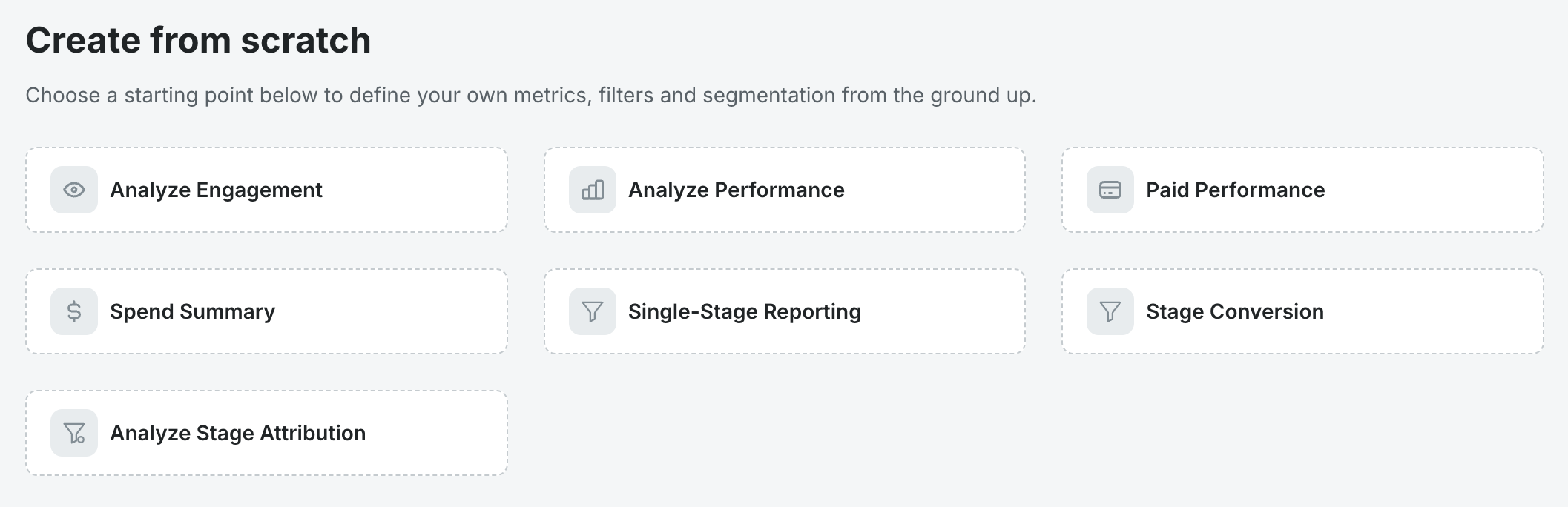
The Eight Report Types
Analyze Engagement
This report type helps you analyze touchpoints (events) such as button clicks, form submissions, and page views. It consolidates data on visitors, contacts, accounts, and the associated channels, sources, and campaigns for each interaction — helping you understand engagement patterns and their influence on pipeline development.
This report type behaves like a cohort analysis where the date range and filters define the cohort you are analyzing. The cohort can be defined by specific user events and specific user and company properties.
The metrics describe the cohort and the performance of the cohort, i.e. how many in the cohort eventually reached a certain Stage.
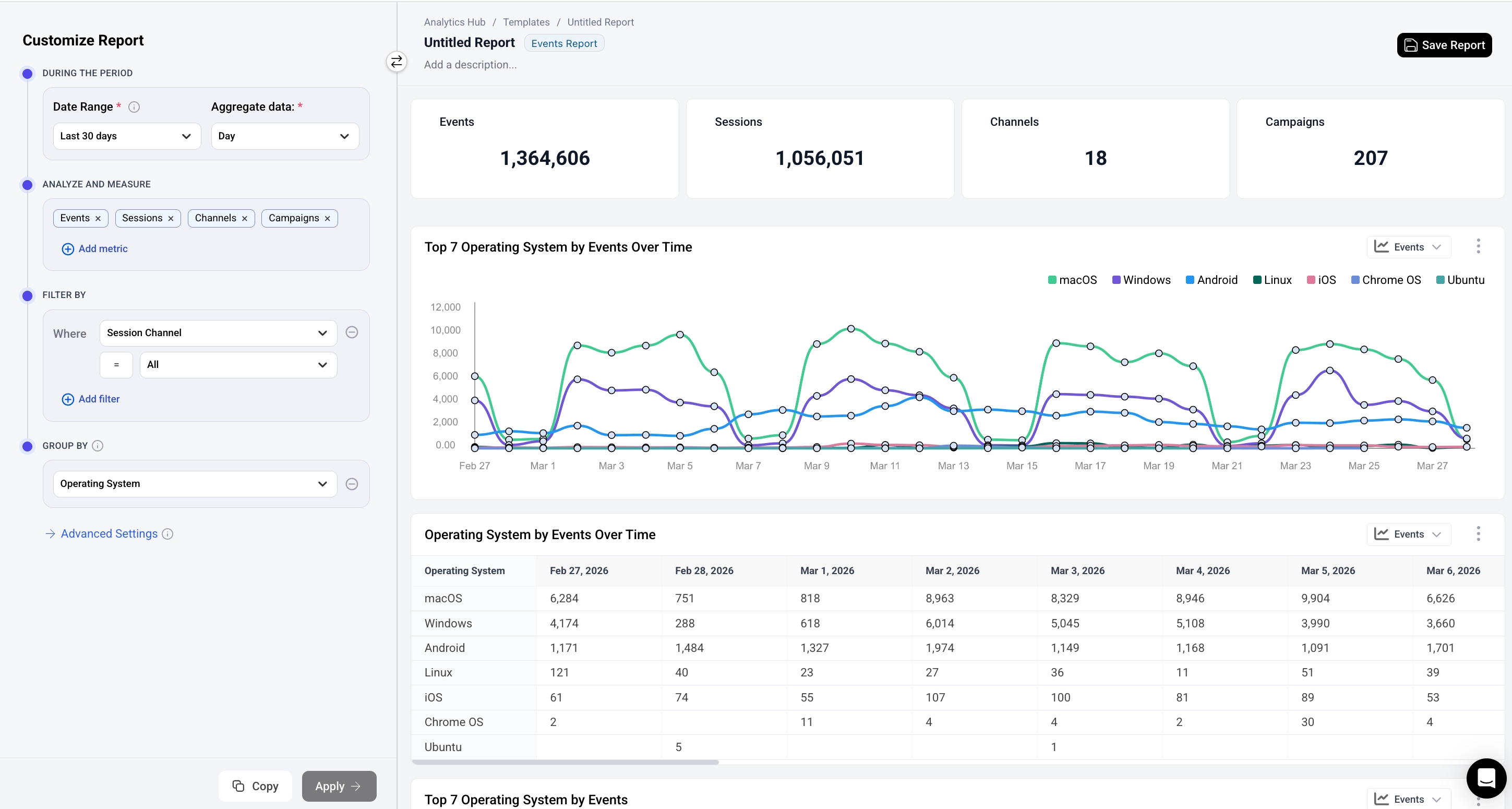
Key metrics: Event Count, Unique Users, Event Frequency, Conversion to Stage
Use cases:
- Track button clicks, form submissions, and page views
- Measure feature adoption and engagement
- Identify drop-off points in user journeys
- Compare event patterns across segments
Configurator note: No stage model is required. The metrics section is labeled "Analyze and Measure."
Analyze Performance
This report type allows you to assess acquisition performance using session data. It measures how channels, sources, and campaigns drive leads, prospects, and deals — helping you understand what influences pipeline creation and apply attribution models for a complete view of performance.
This report type behaves like a cohort analysis where date and filters define the cohort you are analyzing. The cohort can be defined by specific session characteristics like the channel, source or campaign and specific user and company properties.
The metrics describe the cohort and the performance of the cohort - how many of the cohort later reached a certain Stage. This can be combined with a specific attribution model to better define how you want to measure performance.
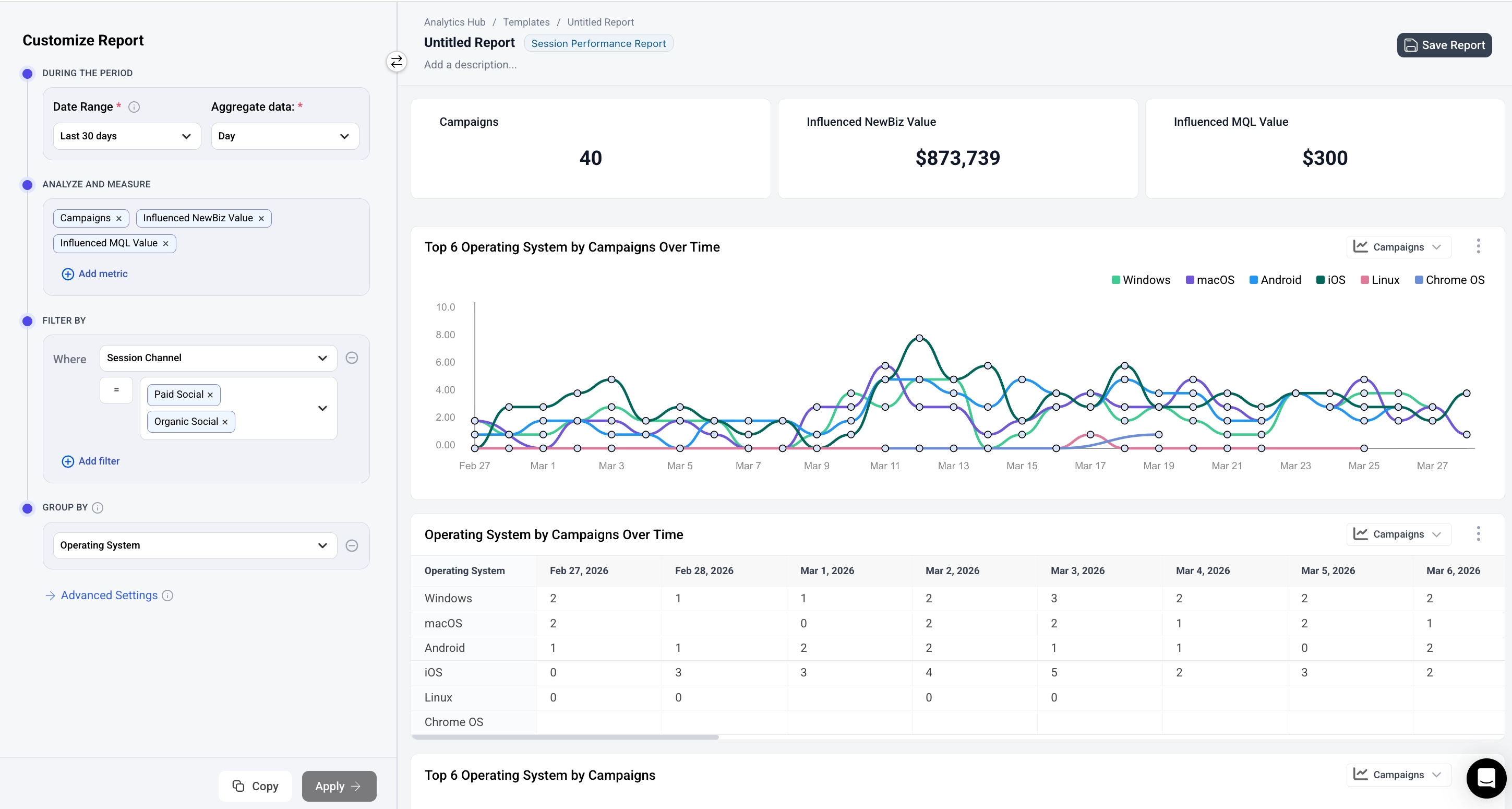
Key metrics: Deals Influenced, Deals Count, Influenced and Attributed Stages and Stage values
Use cases:
- Identify top-performing marketing channels
- Measure campaign effectiveness
- Optimize marketing budget allocation
- Track organic vs. paid acquisition trends
Configurator note: No stage model is required.
Paid Performance
This report type helps you monitor and optimize advertising spend across platforms. It lets you compare cost efficiency between campaigns, spot underperforming ads, and forecast budgets.
Paid Performance reports behave like a cohort analysis where date and filters define the spend/cost period you are analyzing. The cohort can be defined by specific characteristics of the spend such as ad network, campaign or spend type.
The metrics describe the cohort and the performance of the cohort - how many of the cohort later reached a certain Stage. This can be combined with a specific attribution model to achieve a ROAS or ROI type of analysis.
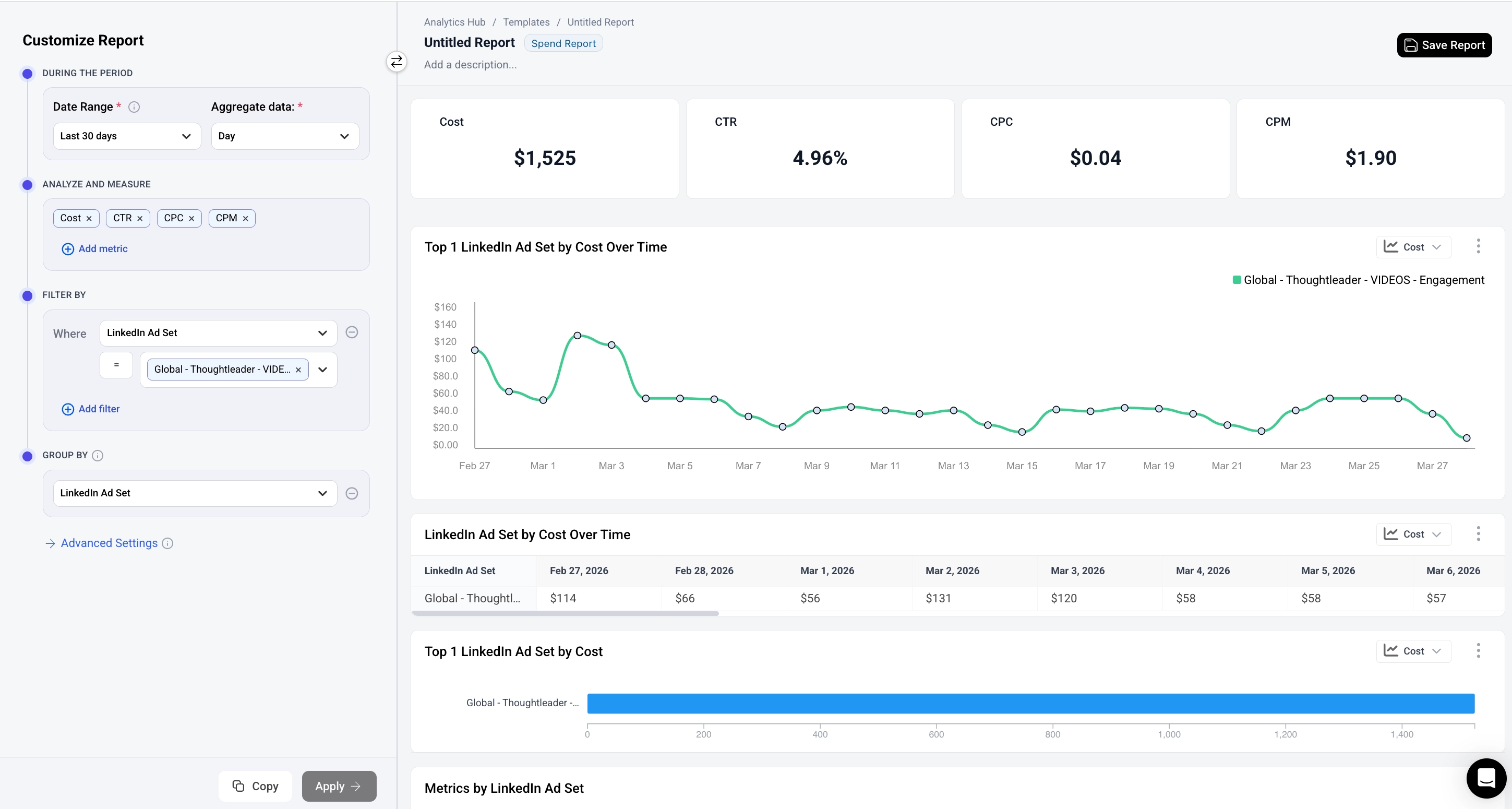
Key metrics: Cost, Impressions, Visitors, Contacts, Companies, CTR, CPC, CPM, CPA, ROI, Influenced and Attributed Stages and Stage values
Use cases:
- Compare cost efficiency between campaigns
- Identify overspending or underperforming ads
- Forecast and plan marketing budgets
Configurator note: No stage model is required.
Spend Summary
This report type helps you monitor and optimize advertising spend across platforms. The metrics describe performance from various platforms in a single place for easy comparison.
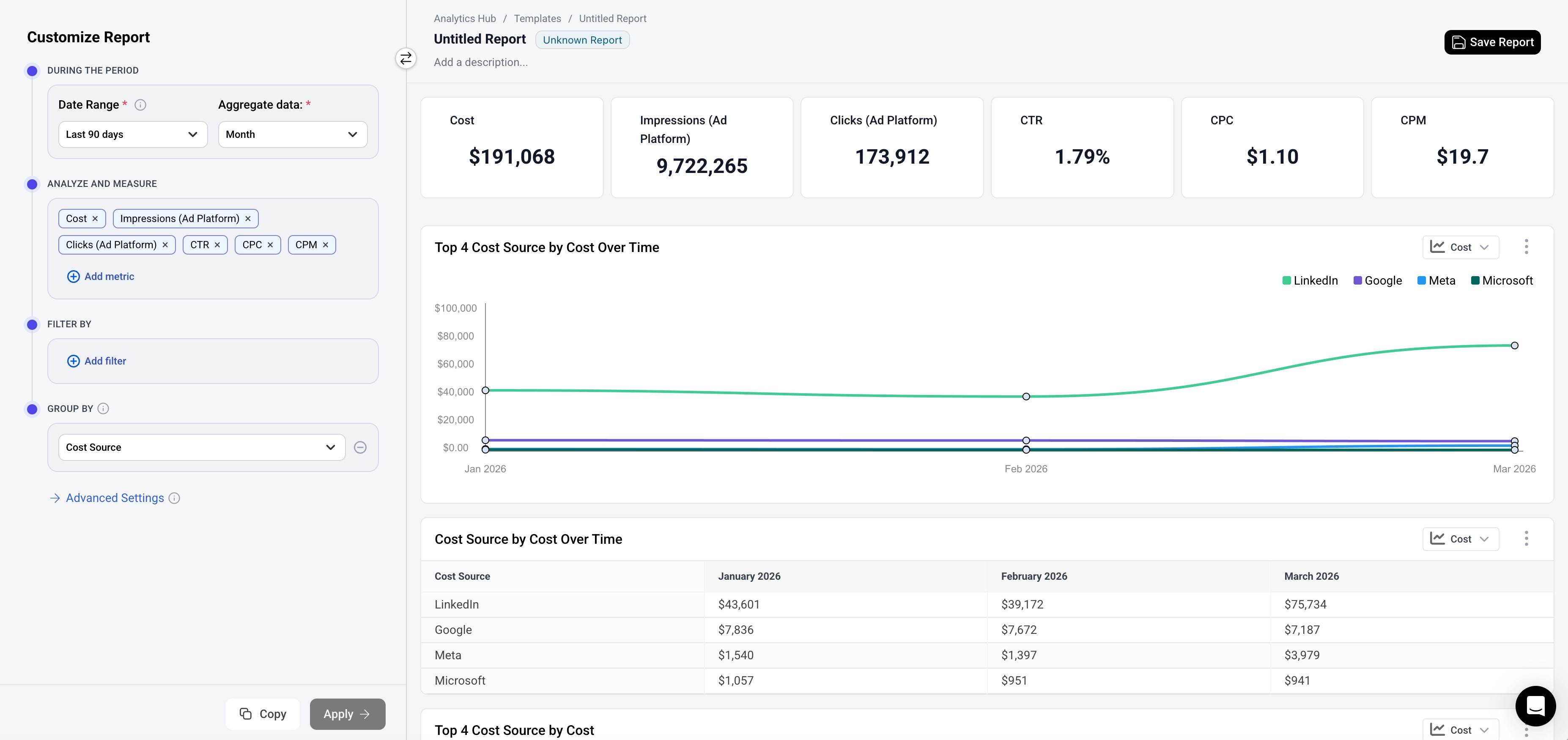
Key metrics: Cost, Impressions, CTR, CPC, CPM, CPA
Use cases:
- Track advertising costs across platforms
- Forecast and plan marketing budgets
Configurator note: No stage model is required.
Single-Stage Reporting
This report type lets you analyze how many deals or leads reached a pipeline stage. You can split the deals by segments and understand how long they took to reach the stage you chose.
Single-Stage Reporting reports focus on Deals or Leads that reach a specific Stage during a period of time and enables description through segmentation. Reports of this type require you to select both a stage and a time period.
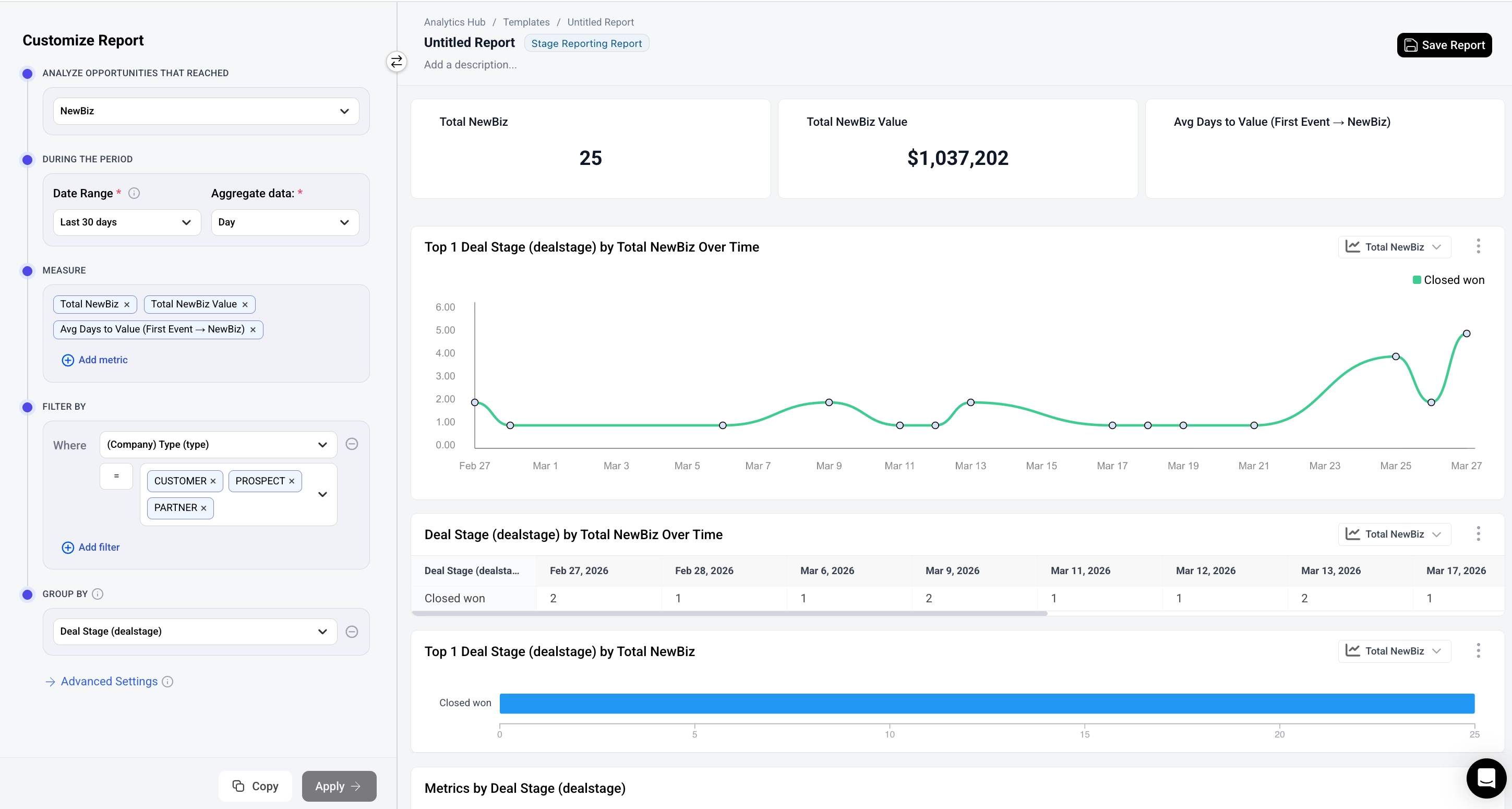
Key metrics: Deals/Leads, Value of Deals/Leads, Average Channels, Touches, Contacts to reach the selected Stage
Use cases:
- Understand your pipeline performance
- Identify which customer segments — industry, region, company size, deal size, and more — drive the most value.
Configurator note: You must select a stage model before configuring the rest of the report. The configurator shows an "Analyze Opportunities That Reached" dropdown at the top where you choose the stage model (e.g., "NewBiz (SQL to Won)"). The metrics section is labeled "Measure."
Analyze Stage Attribution
For deals or leads that reached a selected pipeline stage in a given period, this report type lets you see how value is distributed across the associated marketing touchpoints — by channel, source, campaign, and more.
Analyze Stage Attribution reports focus on deals or leads that reached a specific stage in a period and describes where they came from using Attribution. Reports of this type require you to select a Stage, an Attribution Model, and a Time Period.
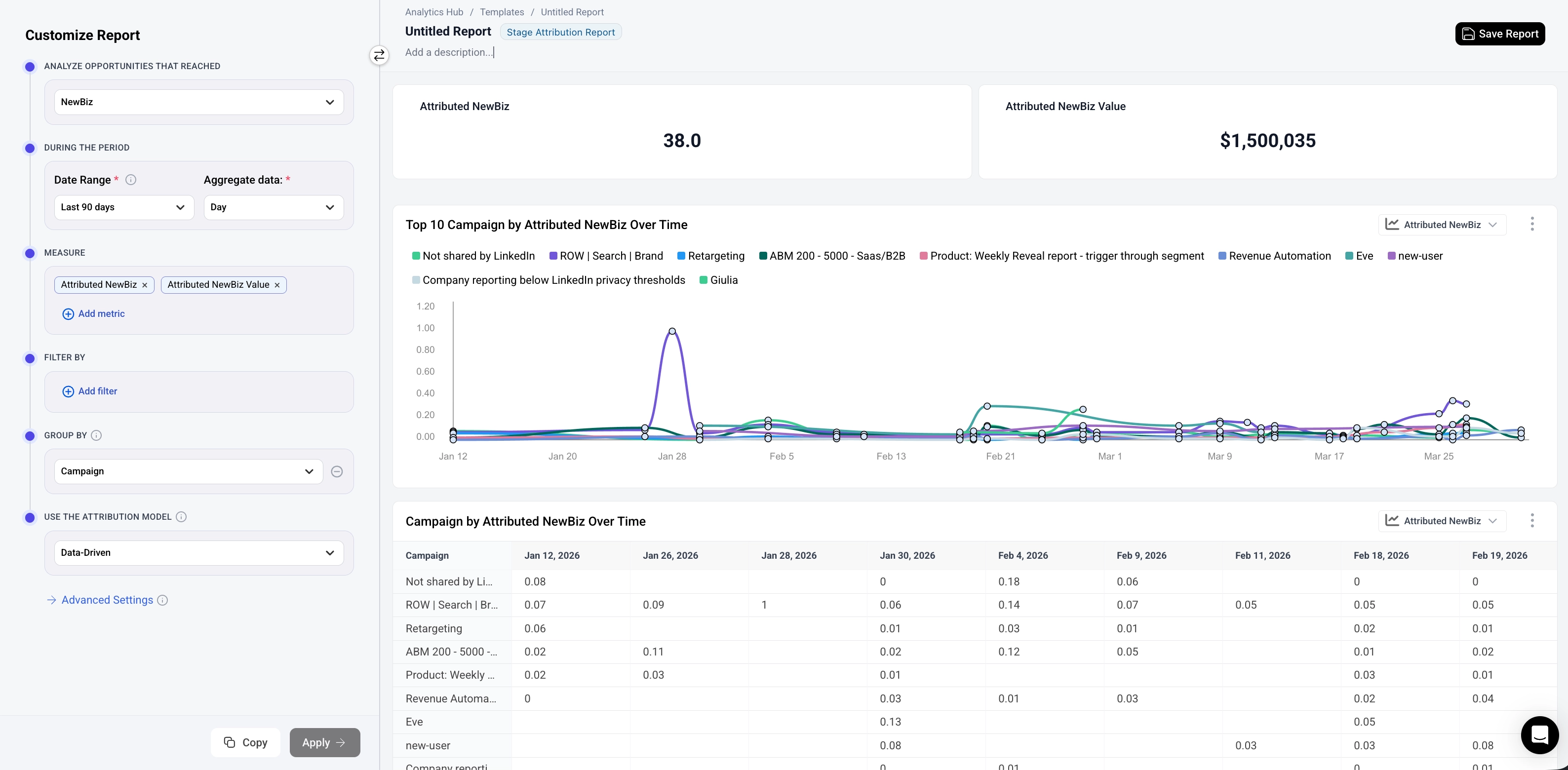
Attributed (default): Deal value is split across the associated touchpoints according to the chosen attribution model — data-driven, linear, W-shaped, etc. Each deal's total value always sums to 100%, so there's no double counting.
Influenced: Instead of splitting value, each touchpoint channel or campaign gets full credit for any deal it was associated with. The same deal can be counted multiple times across different channels.
Key metrics: Attributed Deals/Leads, Attributed value of Deals/Leads
Use cases:
- Where did my deals and leads come from?
- See which channels and campaigns get attributed credit for deals reaching each pipeline stage
- Compare attributed value and deal count across channels, sources, and campaigns
- Understand how credit is distributed across touchpoints using different attribution models (first touch, linear, W-shaped, etc.)
- Report on marketing’s impact on the entire funnel and be accountable for business outcomes
Configurator note: You must select a stage model before configuring the rest of the report, similar to Single-Stage Reporting. The metrics section is labeled "Measure."
Stage Engagement
For deals or leads that reached a selected pipeline stage in a given period, this report type lets you look back at the touchpoints (events) in their journeys before they reached that stage — such as the pages they visited, the forms they submitted, and the content they downloaded.
Stage Engagement reports focus on deals or leads that reached a specific stage during a period of time, and describe the engagement that came before it. By default, the report is grouped by URL, showing which pages appear in the journeys of the deals or leads that reached the stage. You can change the grouping to other event properties, such as Event Name or Content Category, to look at other types of events. Reports of this type require you to select a stage and a time period.
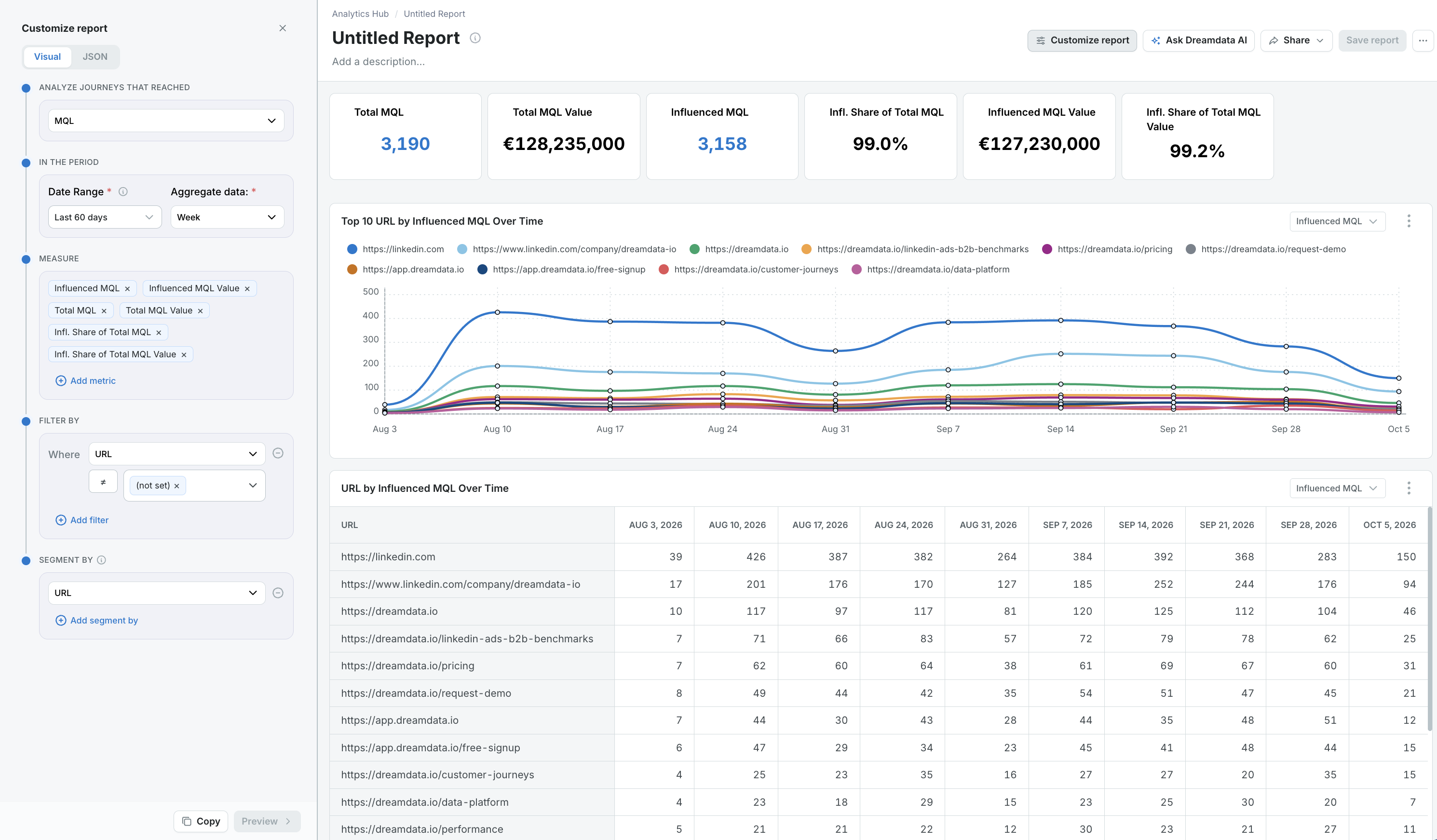
No attribution: Stage Engagement does not use an attribution model and offers no attributed metrics. Influence only records that a touchpoint was present in a journey, never its share of the credit. A deal or lead counts in full for every row whose events appear in its journey, so the same deal or lead can appear in several rows, and the Infl. Share of Total metrics can add up to more than 100% across rows. To see how credit for a stage is distributed across touchpoints, use Analyze Stage Attribution instead.
The full journey is included: The date range selects the stages, not the events. Every event that happened before a deal or lead reached the stage is included, however long before — so a page visited two years ago still counts toward an MQL reached last quarter. There is no lookback setting. To see how far back your journeys reach, add the Avg Days to Value (First Event → Stage) metric.
Stage Engagement vs. Analyze Engagement: Both report types can be grouped by URL, but they start from opposite ends. In Analyze Engagement, the date range selects the events, and the metrics show how many went on to reach a stage. In Stage Engagement, the date range selects the deals or leads that reached the stage, and the report looks backward at their journeys.
Key metrics: Influenced Deals/Leads and Value, Total Deals/Leads and Value, Infl. Share of Total Deals/Leads and Value
Also available: Events, Sessions, Visitors, Page Views, Contacts, Companies, Avg Contacts, Avg Sessions and Avg Channels in the journey, Avg Days to Value (First Event → Stage)
Metric names include the stage you select — for example, Influenced MQL and Total MQL. Contacts and Companies count the contacts and companies that appear in the journeys behind the selected stage, not all contacts and companies in your account.
Use cases:
- Which pages did my MQLs visit before they became MQLs?
- Find the content that appears most often in the journeys of deals or leads reaching a stage
- See which events, such as demo requests or downloads, appear in the journeys before a stage
- Analyze content engagement previously covered by the legacy Content Analytics report
Configurator note: You must select a stage model before configuring the rest of the report. The configurator shows an "Analyze Journeys That Reached" dropdown at the top where you choose the stage (e.g., "MQL"). No attribution model is selected. The metrics section is labeled "Measure."
Stage Conversion
This report type lets you measure how many of the Deals or Leads that reached one pipeline stage went on to reach another stage, and at what rate. You choose the stage the question starts from — the starting stage — and every other stage in your stage models becomes available as a destination.
Stage Conversion reports focus on the Deals or Leads that reached the starting stage during a period of time, and then follow those same stages forward to see which other stages they are connected to. Reports of this type require you to select a starting stage and a time period.
Several destinations can sit in the same report, and each one carries its own conversion window, so a single report can show MQL to SQL within 30 days alongside MQL to Won within 90 days.
Key metrics: Starting Stage Count and Value, Converted to Count, Converted to Value, Conversion Rate
Use cases:
- Measure the conversion rate between any two pipeline stages, such as MQL to SQL or SQL to Won
- Understand how many of a period's leads or deals eventually became customers
- Compare conversion rates across segments — industry, region, company size, source, owner and more
- Track whether conversion is improving over time using a fixed conversion window
Configurator note: You must select a stage model before configuring the rest of the report. The stage model you select is the starting stage — the stage every conversion is measured from. Destination stages are not selected at the top; they are added in the metrics section, which is labeled "Measure."
How Conversion Rates Are Calculated
The rate is counted on the stages themselves. Starting Stage Count is the number of starting stages reached in the report period — the same number Single-Stage Reporting would show for that stage and period. Converted to Count is how many of those same starting stages are connected to a stage in the destination stage model.
Conversion Rate = Converted to Count ÷ Starting Stage Count × 100
What counts as a conversion. A starting stage counts as converted only if it can be connected to a stage in the destination stage model. If it has no such connection, it still counts as a starting stage — it simply does not count as a conversion.
What connects a starting stage to a destination stage. Stage models can be built on different things — an opportunity, a contact, a company — so what connects two stages depends on what the two stage models are built on. Dreamdata uses the most specific match available between them:
The two stages share… | How they are connected |
The same object | When both stage models are built on the same CRM object — the same opportunity, deal or custom object — the two stages are connected on that object's ID. This is the same way a CRM counts movement between two stages of one opportunity, which is why these conversion rates reconcile with the rates you see in your CRM. |
The same contact | Contact-level stage models that are keyed on an email address are connected on that email, so the conversion follows the individual person. |
The same company | Everything else is connected through the company: a contact stage connects to a company stage when the contact's company is the company on the company stage. This is what lets a contact-level stage such as an MQL convert into a company-level stage such as an Opportunity or a Won deal. |
Connections only ever count forwards: the destination stage must have happened at the same time as, or after, the starting stage.
Every destination is measured against all the starting stages. Each destination is calculated against the full set of starting stages on its own, and a starting stage does not need to have passed through the stages in between, so "MQL to Won" is answered directly rather than by multiplying the steps in between together. When several destinations are selected in one report, they are therefore read as an open funnel: each one answers "what share of the starting stages ever reached this stage?", rather than being a step that has to add up with the others.
Conversion windows. By default, every destination stage a starting stage is connected to counts, no matter how long it took — which makes recent periods look weaker than older ones, simply because older stages have had more time to convert. Setting a conversion window on a destination counts only the starting stages that reached it within a given number of days, which is what makes periods of different ages comparable. Each destination carries its own window, so you can cap MQL to SQL at 30 days and MQL to Won at 90 days in the same report.
Filtering and segmentation. Filters and segmentation apply to properties of the starting stage. This means you can break a conversion rate down by the properties of the starting stages — owner, source, region, company size and so on — but not by properties of the destination stage.
A note on Converted to Value. Converted to Count counts starting stages, but Converted to Value sums the value of the destination stages. When several starting stages are connected to one destination — for example several contacts at the same company connected to one deal — that deal's value is counted once per starting stage. Use Converted to Count for conversion rates, and read Converted to Value as the value associated with those conversions.
Stage Model vs. No Stage Model
The eight report types fall into two categories, which each have their own requirements.
Category | Report Types | Stage Model Required? |
Cohort analysis | Analyze Engagement, Analyze Performance, Paid Performance, Spend Summary | No |
Stage-based analysis | Single-Stage Reporting, Analyze Stage Attribution, Stage Engagement, Stage Conversion | Yes |
For stage-based report types, the stage model determines which pipeline stages are included in the analysis. You select the stage model from the "Analyze Opportunities That Reached" dropdown at the top of the configurator. In Stage Engagement reports, this dropdown is labeled "Analyze Journeys That Reached."
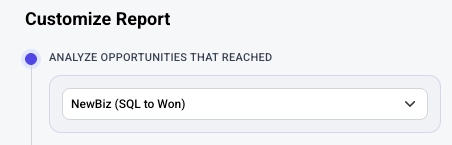
This must be set before you can add metrics and configure the rest of the report.
For more details on configuring reports, see the Configurator guide.
